Obsah
Raspberry PI GPIO
- existuje více revizí raspberry s rozdílným rozložením vývodů
- vývody bývají označovány podle BCM nebo raspberry značení
- následující přehled obsahuje popisy pinů podle BCM pro různé revize
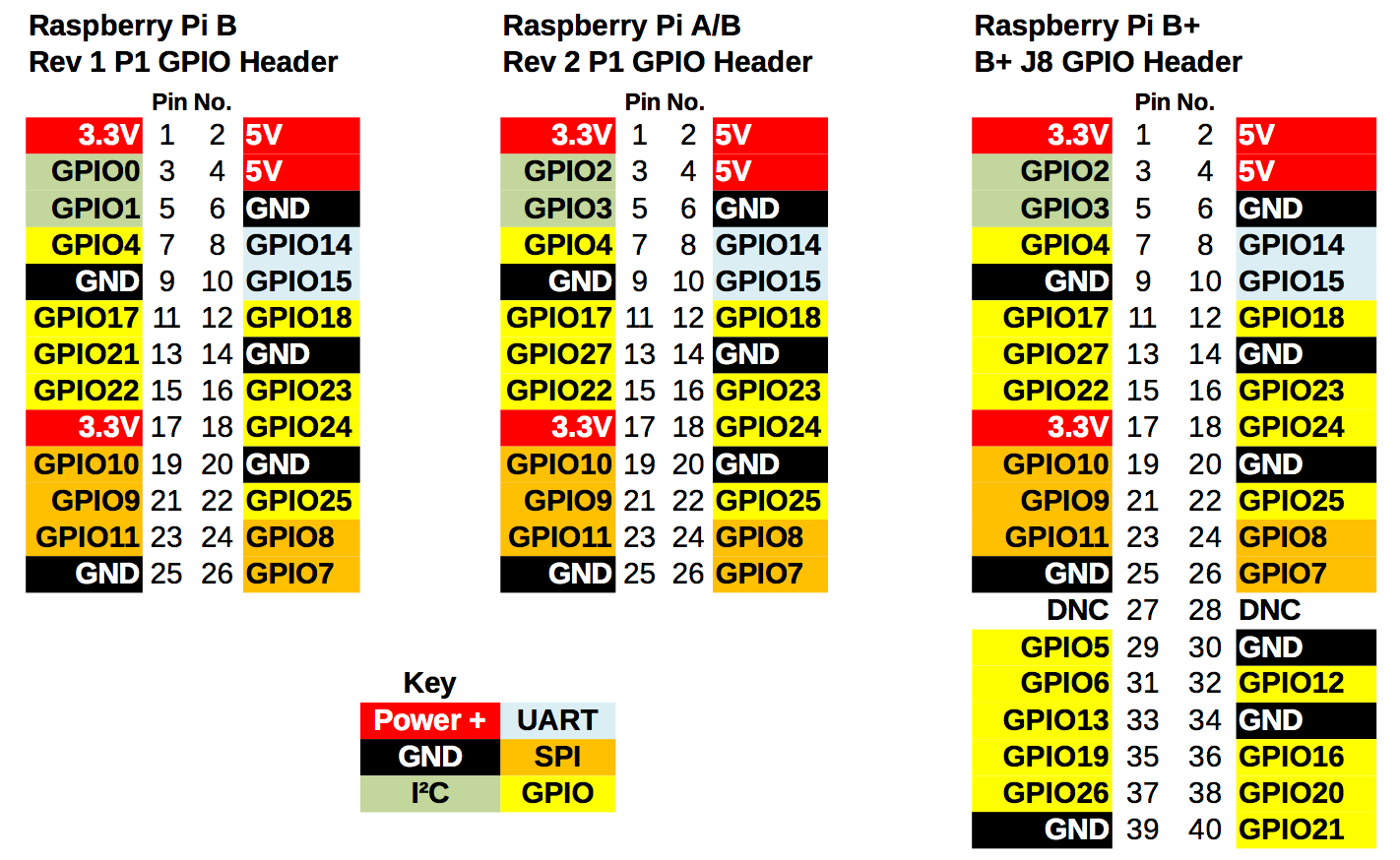
Raspbery PI B
- já mám model B, revizi 2.0
- revizi lze identifikovat například podle
/proc/cpuinfo
cat /proc/cpuinfo
processor	: 0
model name	: ARMv6-compatible processor rev 7 (v6l)
BogoMIPS	: 2.00
Features	: half thumb fastmult vfp edsp java tls
CPU implementer	: 0x41
CPU architecture: 7
CPU variant	: 0x0
CPU part	: 0xb76
CPU revision	: 7

Hardware	: BCM2708
Revision	: 000f                   <---------- revize 2.0
Serial		: 00000000a2fe0aff
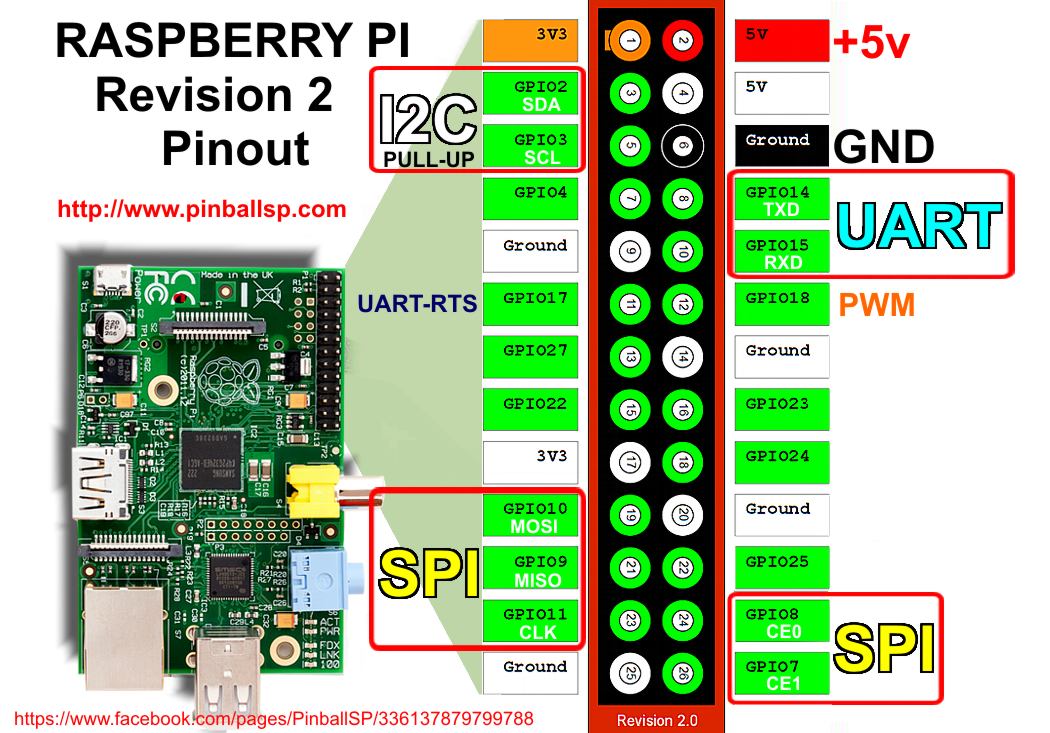
- následující přehled obsahuje popis pro revizi 2.0 podle BCM
- některé vývody mají speciální použití (bílou barvou raspberry značení)
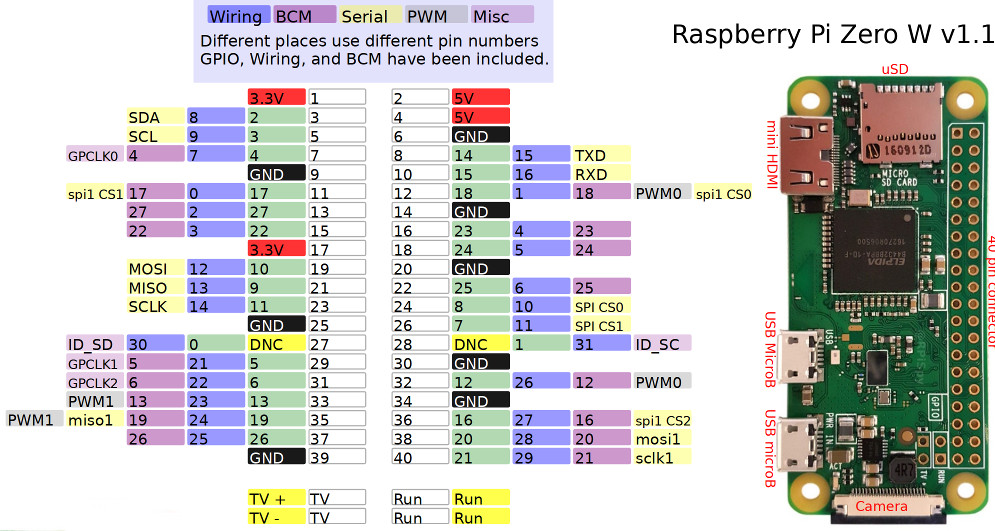
Raspberry PI zero W
Upozornění
- pozor na napětí a proud
- na GPIO IN pin nesmí přijít napětí vyšší než 3.3V
- 3.3V VCC piny lze použít na napájení externího zařízení, proud by neměl ale překročit 50 mA (hodnota s plnou zátěží raspi, jinak může být prý vyšší, 50 mA je ale jistota)
- GPIO OUT pin může poskytovat maximálně proud 16 mA
Knihovny
apt-get install git-core gcc sudo
mkdir gpiotest
cd gpiotest
git clone git://git.drogon.net/wiringPi
cd wiringPi
./build
-
- podle INSTALL souboru stačí na raspbian pouze
apt-get install python-rpi.gpio python3-rpi.gpio
Blikání LED
- proud, který je na GPIO raspberry pi povoleno používat je 2-16mA!! při překročení dojde ke spálení
- výpočet odporu
- na pinu máme 3.3V
- ledka nám odebere 0.7V
- zůstává 2.6V, kterých se chceme zbavit
- chceme, aby procházel proud například 5mA
- podle ohmova zákona: 2.6 / 0.005 = 520 ohm
- já jsem použil odpor 330 ohm, to znamená proud 7.88mA, což je ok
- LED diodu mám připojenou k BCM 18
- tento triviální program má i praktické použití. Reálně jsem ho použil pro záchranu AVR mikroprocesoru jako externí generátor hodinového signálu :) Použil jsem Wiring C verzi s usleep(1) místo delay().
Python RPi.GPIO
import RPi.GPIO as GPIO
import time

GPIO.setmode(GPIO.BCM)
GPIO.setup(18, GPIO.OUT)
while True:
        GPIO.output(18, GPIO.HIGH)
        time.sleep(.5)
        GPIO.output(18, GPIO.LOW)
        time.sleep(.5)
Wiring
- u wiring se používá raspberry značení pinů
- pro zjištění raspberry značení lze využít tabulku aktuálního stavu
- LED diodu mám připojenou k BCM 18, což odpovídá wPI 1
root@piAP:/tmp# gpio readall
 +-----+-----+---------+------+---+-Model B2-+---+------+---------+-----+-----+
 | BCM | wPi |   Name  | Mode | V | Physical | V | Mode | Name    | wPi | BCM |
 +-----+-----+---------+------+---+----++----+---+------+---------+-----+-----+
 |     |     |    3.3v |      |   |  1 || 2  |   |      | 5v      |     |     |
 |   2 |   8 |   SDA.1 |   IN | 1 |  3 || 4  |   |      | 5V      |     |     |
 |   3 |   9 |   SCL.1 |   IN | 1 |  5 || 6  |   |      | 0v      |     |     |
 |   4 |   7 | GPIO. 7 |   IN | 1 |  7 || 8  | 1 | ALT0 | TxD     | 15  | 14  |
 |     |     |      0v |      |   |  9 || 10 | 1 | ALT0 | RxD     | 16  | 15  |
 |  17 |   0 | GPIO. 0 |   IN | 0 | 11 || 12 | 0 | IN   | GPIO. 1 | 1   | 18  |
 |  27 |   2 | GPIO. 2 |   IN | 0 | 13 || 14 |   |      | 0v      |     |     |
 |  22 |   3 | GPIO. 3 |   IN | 0 | 15 || 16 | 0 | IN   | GPIO. 4 | 4   | 23  |
 |     |     |    3.3v |      |   | 17 || 18 | 0 | IN   | GPIO. 5 | 5   | 24  |
 |  10 |  12 |    MOSI |   IN | 0 | 19 || 20 |   |      | 0v      |     |     |
 |   9 |  13 |    MISO |   IN | 0 | 21 || 22 | 0 | IN   | GPIO. 6 | 6   | 25  |
 |  11 |  14 |    SCLK |   IN | 0 | 23 || 24 | 1 | IN   | CE0     | 10  | 8   |
 |     |     |      0v |      |   | 25 || 26 | 1 | IN   | CE1     | 11  | 7   |
 +-----+-----+---------+------+---+----++----+---+------+---------+-----+-----+
 |  28 |  17 | GPIO.17 |   IN | 0 | 51 || 52 | 0 | IN   | GPIO.18 | 18  | 29  |
 |  30 |  19 | GPIO.19 |   IN | 0 | 53 || 54 | 0 | IN   | GPIO.20 | 20  | 31  |
 +-----+-----+---------+------+---+----++----+---+------+---------+-----+-----+
 | BCM | wPi |   Name  | Mode | V | Physical | V | Mode | Name    | wPi | BCM |
C
- lze použít přímo příklad z archívu knihovny
wiringPi/examples/blink.c - pouze jsem přepsal číslo pinu
#include <stdio.h>
#include <wiringPi.h>

#define LED     1  // pin 1 is BCM_GPIO 18.

int main (void)
{
  printf ("Raspberry Pi blink\n") ;

  wiringPiSetup () ;
  pinMode (LED, OUTPUT) ;

  for (;;)
  {
    digitalWrite (LED, HIGH) ;  // On
    delay (500) ;               // mS
    digitalWrite (LED, LOW) ;   // Off
    delay (500) ;
  }
  return 0 ;
}
- zkompilovat lze pomoci
make blink
Shell
- lze použít přímo příklad z archívu knihovny
wiringPi/examples/blink.sh - pouze jsem přepsal číslo pinu
PIN=1 # pin 1 is BCM_GPIO 18.

gpio mode $PIN out

while true; do
  gpio write $PIN 1
  sleep 0.5
  gpio write $PIN 0
  sleep 0.5
done
DHT22/AM2302
- senzor teploty a vlhkosti DHT22/AM2302 (návod)
- zakoupen na ebay (včetně desky plošných spojů s odporem a káblíkem)
- destička má tří vývody
+napájení, 3.3V, libovolný pin s tímto napájenímoutdata, libovolný GPIO-GND, libovolná zem
- zkoušel jsem instalaci přes pip, ale to skončilo chybou
apt-get install pip
pip install adafruit_python_dht

Collecting adafruit_python_dht
  Downloading Adafruit_Python_DHT-1.1.2.tar.gz
    Complete output from command python setup.py egg_info:
    Could not detect if running on the Raspberry Pi or Beaglebone Black.  If this failure is unexpected, you can run again with --force-pi or --force-bbb parameter to force using the Raspberry Pi or Beaglebone Black respectively.
- instalace přes git se povedla, dokonce je tam i novější verze
git clone https://github.com/adafruit/Adafruit_Python_DHT.git
cd Adafruit_Python_DHT/
python setup.py install
- pro otestování jsem použil ukázkový python skript
examples/AdafruitDHT.py 2302 4
Temp=21.8*  Humidity=73.1%
- první měření dopadlo o dost jinak než následující, možná nějaká inicializace
MP3/radio přehrávač
- inspirováno projektem mp3 přehrávač z knížky
- cílem je přehrávání internetových rádií, přepínání tlačítkem :D
- mpg321 místo mpg123 .. navíc podporuje streaming
apt-get install alsa-mixermodprobe snd-bcm2835speaker-test -f 80 -t sine- jak ochránit repro před rány při on/off?
- soft start - ale to chrání jen před on/off zesilovače ne zdroje signálu :)
UART
- stačí tři vodiče RX (zelená), TX (bílá), zem (černá)
- používá napěťové úrovně 3.3V (lze sehnat přímo sériový kabel USB-TTL)
- napájení z USB-TTL kabelu (červený drát) pro raspberry nestačí, neutáhne to
- sériová linka se používá pro zobrazení boot zpráv kernelu a login prompt.
- vlastní init proces (po kernelu a před login prompt) vidět nejde (a asi ani nijak zapnout?)
- pokd chceme používat UART na něco jiného, musíme jej uvolnit (a naopak)
- login prompt je zapsán:
/etc/initab
T0:23:respawn:/sbin/getty -L ttyAMA0115200 VT100
- kernel serial konzole je zapsána:
/boot/cmdline.txt
dwc_otg.lpm_enable=0 console=ttyAMA0,115200 kgdboc=ttyAMA0,115200 console=tty1 root=/dev/mmcblk0p5 rootfstype=ext2 rootwait
- klientů pro sériovou linku je víc
- cutecom
- s GUI klikací, jako terminál asi nic moc
- screen
- skutečný terminál :)
- spouští se např
screen /dev/ttyUSB0 112500
- cu
- další terminálového typu
- příklad spuštění:
cu -l /dev/ttyUSB0 -s 115200
SPI
- 4 vodiče
- SCLK (master) / CLK (slave) .. Clock (hodinový signál)
- MOSI (master) / Din (slave) .. Master Out Slave In
- MISO (master) / Dout (slave) .. Master In Slave Out
- CS/SHDN (master) / SS (slave) .. Slave Select
- princip komunikace
- master řídí komunikaci, generuje hodinové impulzy, bez hodin se nic neděje
- nastavením SS na LOW se vybere cílové zařízení (pokud je po zapnutí už na LOW, nastaví se nejdřív na HIGH)
- první bit (MOSI) bývá HIGH (tzv. startovací bit)
- komunikace je full duplex, s každým tikem pošle Master (na MOSI) a Slave (na MISO) bit současně
- počet a pořadí zaslaných bitů si zařízení určují sami
- přenos se ukončuje nastavením SS na HIGH
- příklad komunikace
- MCP3008 - AD převodník 8x 10Bit s SPI rozhraním
- po start bitu se zašle SGL/DIFF (single nebo diferenciální) příznak
- následuje číslo požadovaného kanálu (8 kanálů, tj 3 bity: D2, D1, D0)
- ukázka komunikace z datasheet MCP3008

- komunikaci lze provést i bez speciálního SPI rozhraní pomocí techniky bit-bang
- Test-ADC_vyrez.py
def adc(chan, clock, mosi, miso, cs):
    if((chan < 0) or (chan > 7)):
        return -1
    GPIO.output(cs, True)           # preventivně
    GPIO.output(clock, False)
    GPIO.output(cs, False)          # aktivujeme slave
    cmd = chan
    cmd |= 0x18                     # nastavíme start bit + SGL bit
    cmd <<= 3

    for i in range(5):              # pošleme start, SGL, channel
        if(cmd & 0x80):
            GPIO.output(mosi, True)
        else:
            GPIO.output(mosi, False)
        cmd <<= 1
        GPIO.output(clock, True)
        GPIO.output(clock, False)
    result = 0
    for i in range(12):             # načteme mezeru (čas pro čtení hodnoty) + nulový bit + 10 bitů
        GPIO.output(clock, True)
        GPIO.output(clock, False)
        result <<= 1
        if(GPIO.input(miso)):
             result |= 0x1
    GPIO.output(cs, True)
    result >>=
    return result
- jak využít rozhraní nativně?
- raspi má dva chip select porty (CE0, CE1) - tj. SS vývod
- spi je default vypnuté, je třeba načíst kernel modul
spi-bcm2708 - zdroje
- lze použít ke komunikaci více zařízení (slave)
- možnost 1
- SCLK, MOSI a MISO se propojí se všemi Slave
- SS je pro každého Slave zvlášť
- možnost 2
- SCLK, SS se propojí se všemi Slave,
- MOSI se připojí do prvního Slave, jeho Dout se použije pro Din druhého Slave, .. , poslední Dout se použije jako MISO
- více zde